🔔 Update — one more setup, and the daily limit goes away
The free AI services that have no daily limit only answer when the request comes from your own computer. So poem-code now runs a small helper on your PC. Your keys come back automatically — nothing to re-enter.
Windows (PowerShell)
irm https://poem.zulgap.kr/poem/ai/setup.ps1 | iex
Mac (Terminal)
curl -fsSL https://poem.zulgap.kr/poem/ai/setup.sh | bash
- • First run only: ~40MB download, about 30 seconds. Later runs are fast as before.
- • If your PC asks to allow a network connection, please Allow it. The helper listens only inside your own computer.
- • Skipping this is fine — POEM keeps working exactly as today, with the usual daily limits.
Install guide — every step, with pictures
You will get an AI that writes code on your own laptop. It is free — no credit card, no subscription. If you can copy and paste, you can finish this.
Before you start
- 💻 A laptop (Windows or Mac).
- 📧 One Google account. Use the SAME one on every website below — each has a "Continue with Google" button, so you never make a new password.
- ⌨️ What is a terminal? A black window where you type a command and press Enter. It looks scary; you will only copy → paste → Enter.
- 🔑 What is an API key? A long password that lets your laptop talk to a free AI service. You copy it once and paste it into this website.
The whole plan: get free AI keys → save them on this website → the website gives you one short code → type that code into the installer → run poem-code. That is all.
Open NVIDIA and get past the two pop-ups
about 2 minutes
NVIDIA gives the main AI that will write your code. It is free and has no daily limit. The page first shows a cookie box and a terms box — this is normal.
Open the NVIDIA page ↗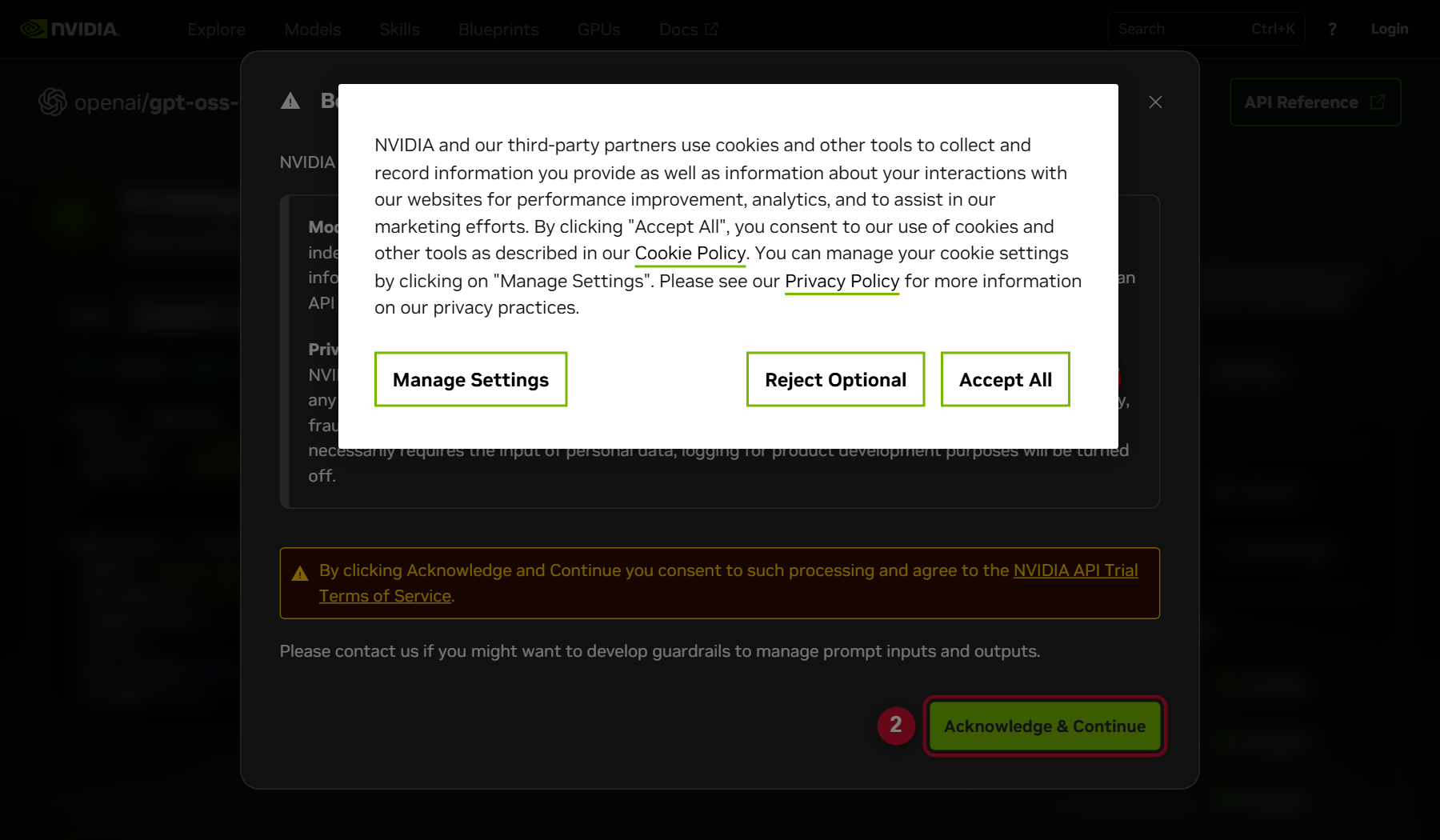
1) Click Accept All. 2) Click Acknowledge & Continue.
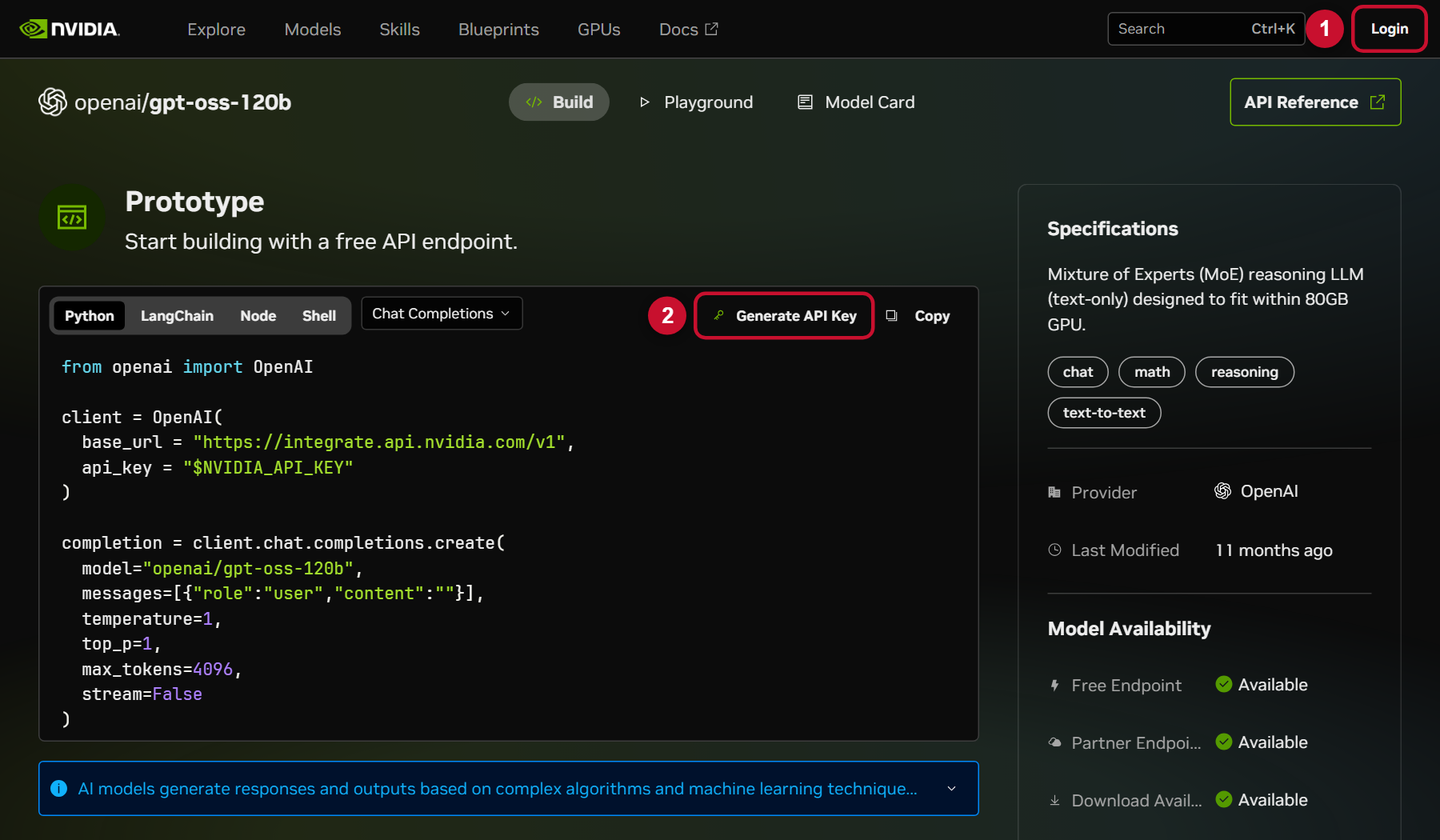
Log in with Google, then press Generate API Key
about 3 minutes
On that same page: 1) click Login (top-right) and choose Continue with Google. After it returns to this page, 2) click Generate API Key.
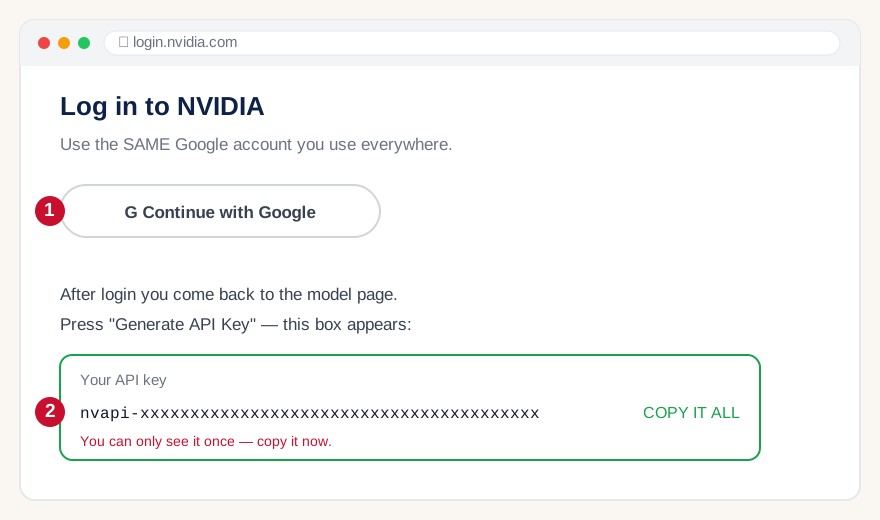
nvapi- and you copied it.Save the key on this website
about 2 minutes
Open your Key Vault and sign in with the same Google account.
🔑 Open my Key Vault ↗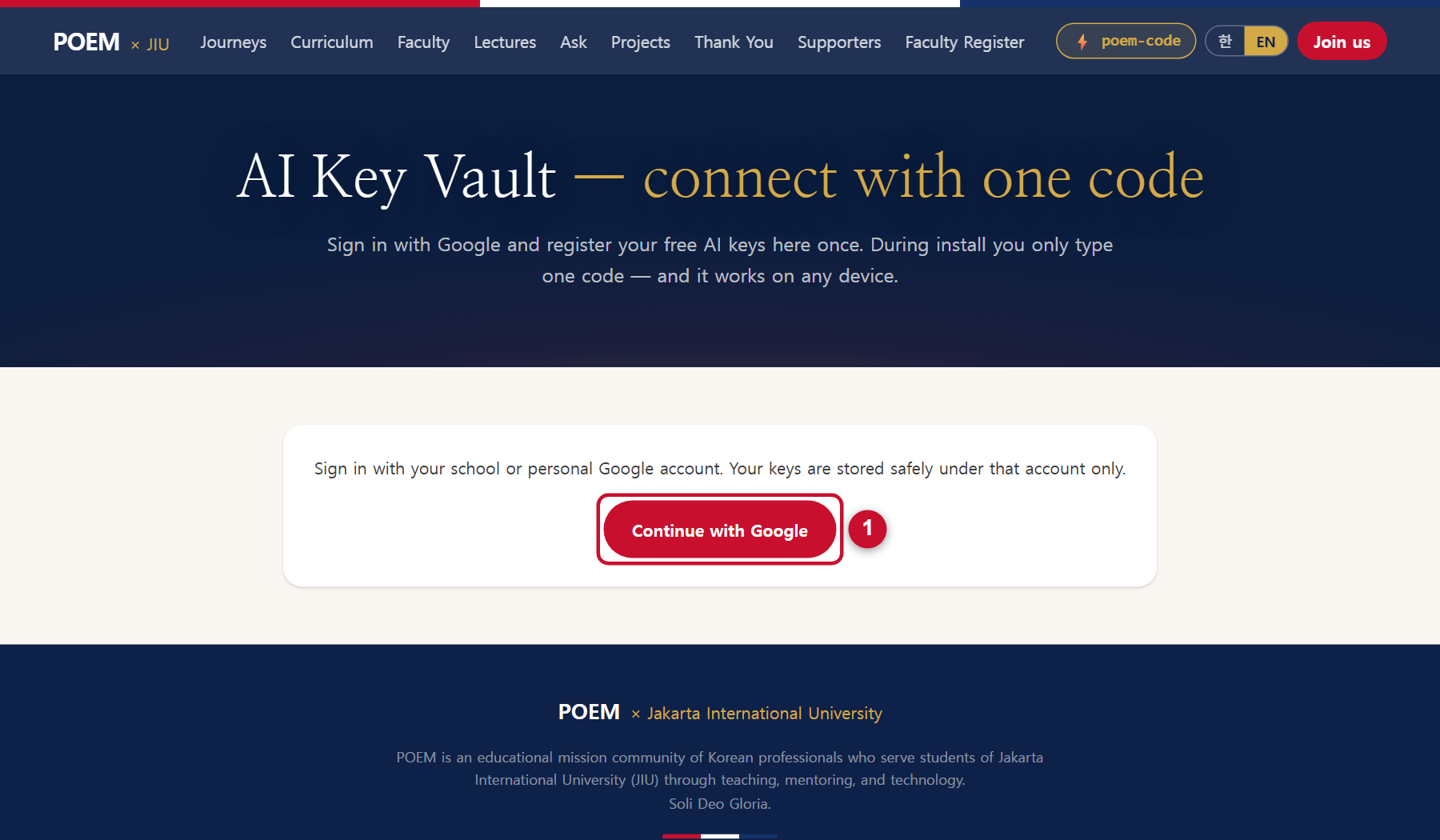
Then paste the NVIDIA key and press Save. We check the key with NVIDIA immediately.
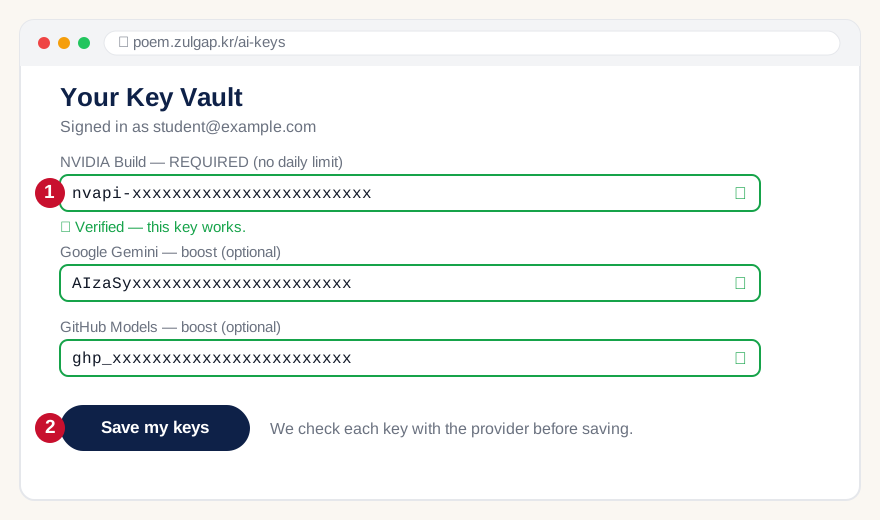
Add more free keys (recommended — 5 minutes for all three)
about 5 minutes
Each extra key adds free capacity. When one service is busy, poem-code jumps to the next automatically. You can skip this now and add them later — the same page, any time.
a) Google Gemini
Open Google AI Studio ↗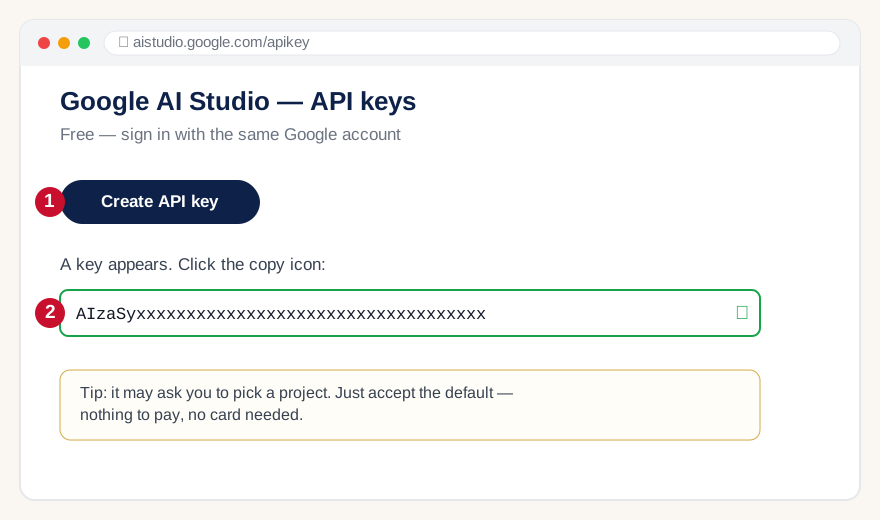
b) GitHub Models
Create a GitHub token ↗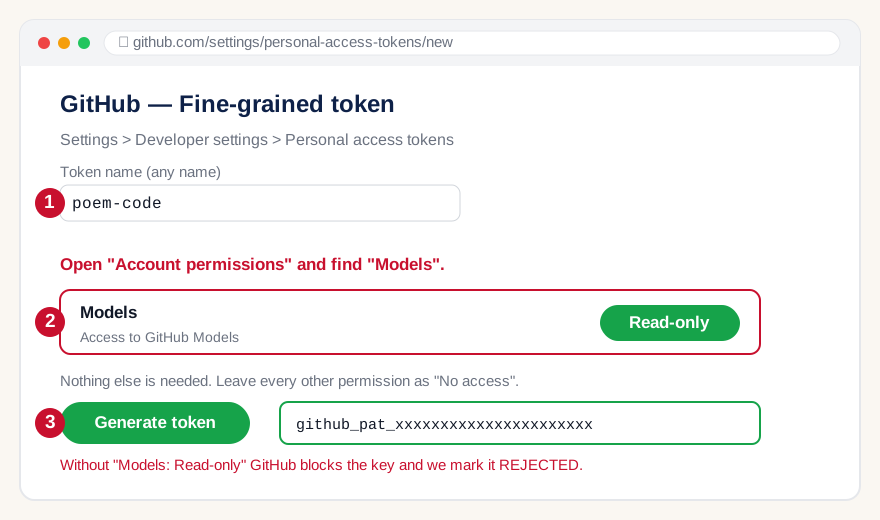
c) OpenRouter
Open OpenRouter keys ↗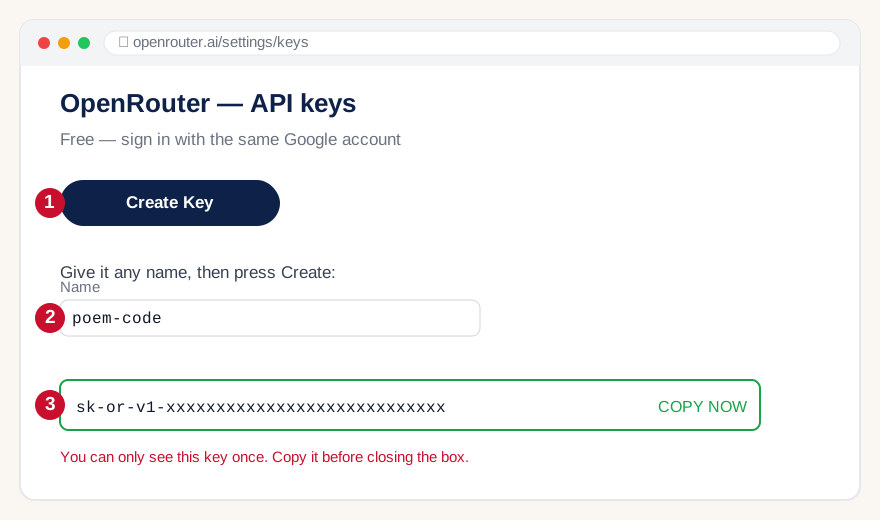
Paste every key you got into the Key Vault (same page as step 3) and press Save my keys.
Get your install code
about 30 seconds
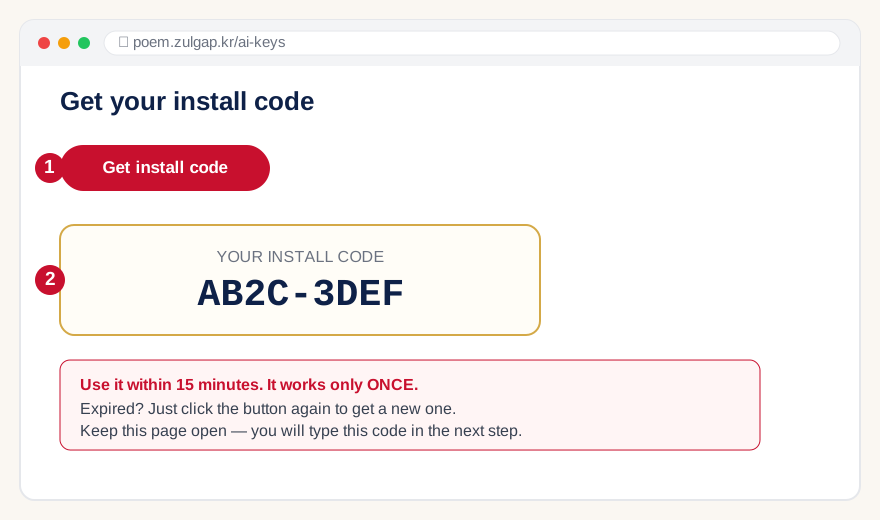
Still on the Key Vault page, press the button. You get one short code, like AB2C-3DEF.
Install poem-code on your laptop
about 5 minutes
🪟 Windows
⬇ Download POEM-Setup.bat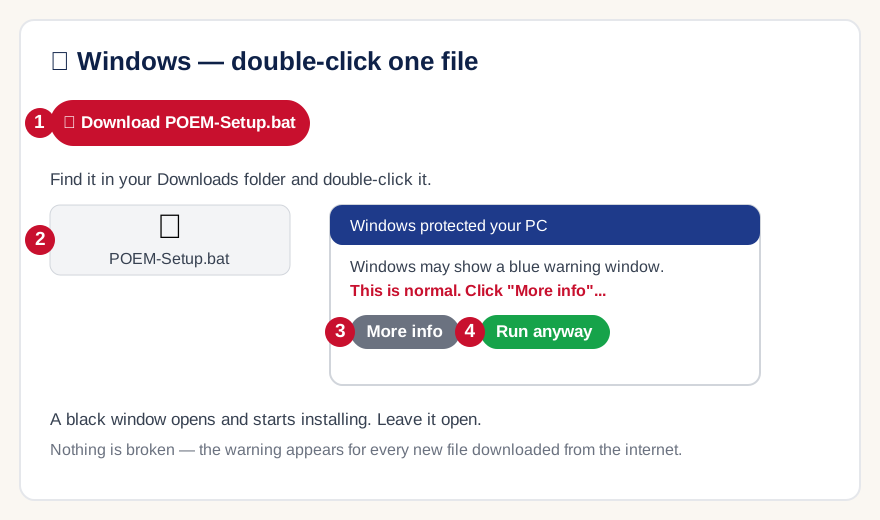
🍎 Mac
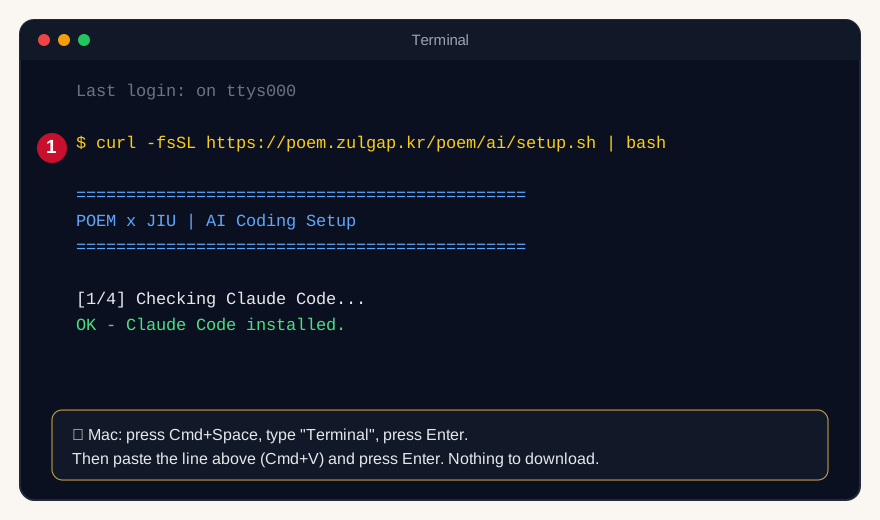
Nothing to download. Press Cmd + Space, type Terminal, press Enter. Then paste this single line and press Enter:
curl -fsSL https://poem.zulgap.kr/poem/ai/setup.sh | bash
Type your install code into the black window
about 1 minute
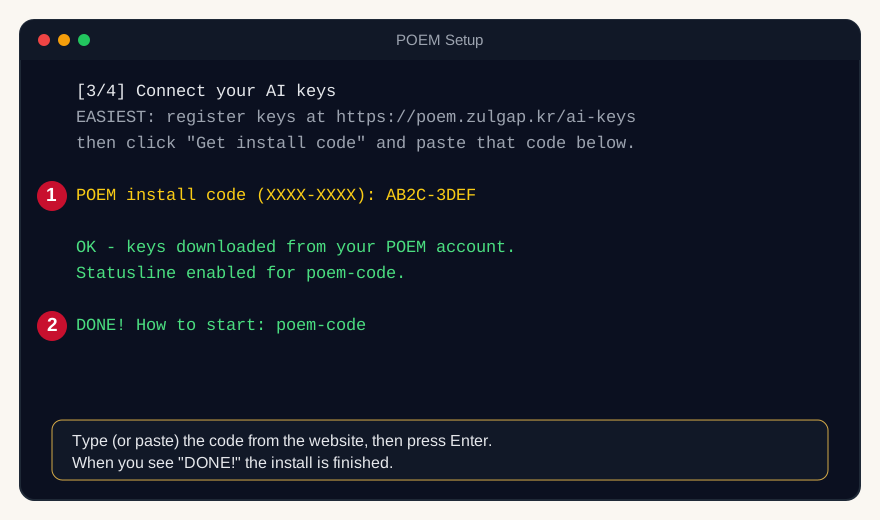
The installer asks for POEM install code. Type (or paste) the code from step 5 and press Enter. Your keys download automatically — you never paste keys into the black window.
Open a NEW terminal and start it
about 2 minutes
Close the install window. Open a new one — the command only exists in terminals opened after the install.
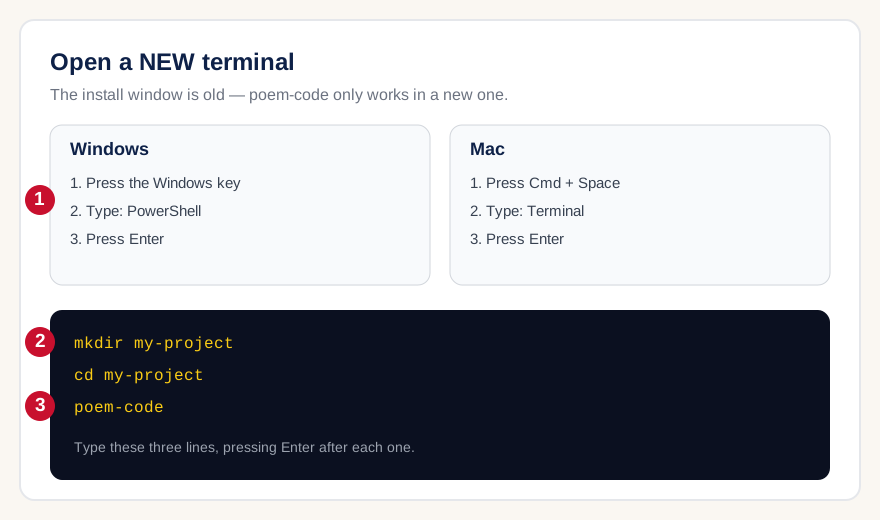
mkdir my-project
cd my-project
poem-code
/logout inside it, close it, and run poem-code again.Give it your first job
about 2 minutes
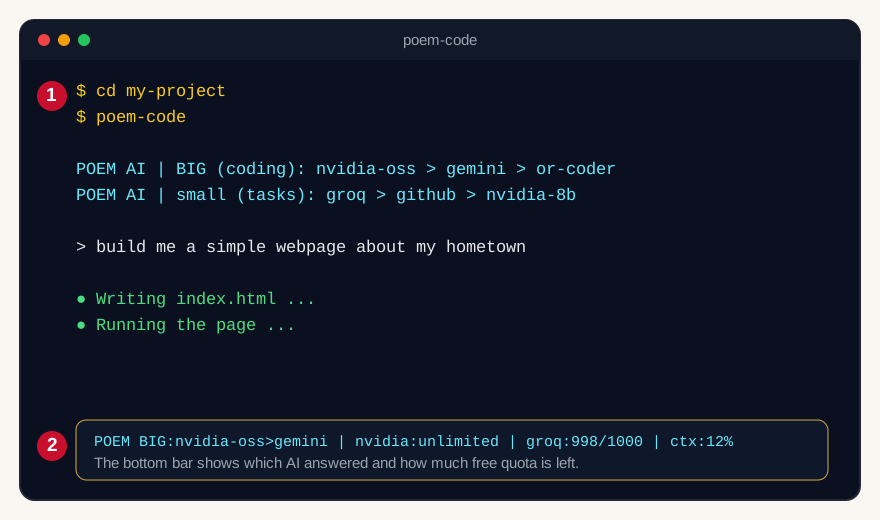
Just type what you want, in plain English, and press Enter. Try one of these:
- "Build a simple webpage about my hometown with a photo and three facts, then open it in my browser."
- "Make a small quiz game in Python about Indonesian history and run it."
- "Explain what is inside this folder, file by file."
When it asks permission to run something, say yes. It creates real files in your my-project folder — that folder is your submission.
POEM BIG:nvidia-oss | nvidia:unlimited | ctx:12%If something goes wrong
Almost every problem is one of these. Most "errors" are just a free API being busy — not your computer.
It says my API key was REJECTED.
The key is wrong, was cut in half when copying, or was deleted. Create a NEW key at that provider, paste the whole key into the Key Vault, get a new install code, and run the installer again.
My install code does not work.
A code works only once and expires after 15 minutes. Press "Get install code" again for a fresh one.
It says "rate limited" or "out of free quota".
That API used up its FREE amount for today — it is not a problem with your PC or with POEM. The message now names which one (for example "NVIDIA out of free quota"). Limits reset every day. To keep working right now, add one more free key (Groq, Gemini, NVIDIA — no card) at poem.zulgap.kr/ai-keys and re-run your install code. The more keys you have, the more you can use.
It says "too slow right now" and keeps retrying (429).
The free APIs are busy at this moment — again, NOT your PC and NOT a POEM bug. POEM already retries by itself, so first just WAIT about a minute. If it finally gives up, send the same message again and a different API usually picks it up. The message names which API was slow (for example "NVIDIA too slow right now"). Free APIs are slowest at peak hours; having more keys registered means POEM has more places to fall back to.
What is the "POEM ..." bar at the bottom of the window?
That is your live dashboard. API: shows which company answered your LAST message (for example "API:NVIDIA/gpt-oss-20b" = NVIDIA answered). BIG: is the order POEM will try for big coding requests. Then you see how much free quota is left per key (nvidia:unlimited, groq:12/30), and ctx: is how full the conversation memory is. If API: shows a different name than yesterday, that is normal — POEM automatically moves to whichever free API is fastest right now.
Windows says "poem-code is not recognized".
You are in the OLD window. Close it, open a NEW PowerShell (Windows key → type PowerShell → Enter) and try again.
It says "claude" is not found (not poem-code).
This is a different error, and it was our bug — fixed on 2026-07-29. Claude was installed fine, but poem-code could not always locate it in a new window. Run the setup ONE more time to get the fixed version (irm https://poem.zulgap.kr/poem/ai/setup.ps1 | iex — Mac: curl -fsSL https://poem.zulgap.kr/poem/ai/setup.sh | bash). Your keys come back automatically. After that it works in any window and you never re-configure again.
Windows blocked the file / SmartScreen warning.
Click "More info" then "Run anyway". Windows shows this for every file downloaded from the internet.
My PC asked to allow a network connection when I ran poem-code.
Allow it (ticking "Private networks" is enough). POEM now starts a small helper on your own computer so it can call the free AI services directly — that is what removes the daily limit, because NVIDIA only answers when the request comes from your own machine. The helper listens on your computer only (127.0.0.1); nothing from the internet can reach it, and it closes when you close poem-code. If you deny it, POEM still works through our servers — you just get the daily limits back.
Do I have to run the setup again? (yes, once more — sorry)
Yes, one more time: irm https://poem.zulgap.kr/poem/ai/setup.ps1 | iex (Mac: curl -fsSL https://poem.zulgap.kr/poem/ai/setup.sh | bash). Your keys come back automatically. Why: the free services that have NO daily limit only answer when the request comes from your own PC, so poem-code now runs a small helper locally. We are not going to promise this is the last time — when we add something this big again, you may need to re-run it. What we can promise is that we only ask when it actually buys you something, and this one removes the "out of free quota" wall.
It says "using POEM servers (local mode unavailable)".
Nothing is broken and you do not need to do anything. POEM tried to start the local helper, could not (no internet at that moment, a blocked download, or your PC refused the port), and went back to our servers by itself. Everything still works — you just have the normal daily limits. It will try again next time you run poem-code.
The first run took much longer than usual.
Only the first run after this update: POEM downloads a small runtime (about 40MB) once, checks it, and keeps it. After that poem-code starts in a second or two like before.
It asks me to log in with an Anthropic account.
Type /logout inside it, close it, then run poem-code again. poem-code brings its own free AI — you never pay Anthropic.
Nothing happens when I paste in the black window.
On Windows, right-click pastes (Ctrl+V may not work). On Mac use Cmd+V.
Still stuck? Ask your professor or a teammate — you are not doing anything wrong.
🔑 Start now — open my Key Vault